For SENDCos and class teachers in UK schools
The SEND coach
for your school.
Say what you need. Get it back finished.
An AI coach built for SEND and made safe for schools. Ask for a support plan, targets, a review, a letter home or a class resource, in your own words. You check it before you keep it.
Free during preview · No commitment · Inclusion is more than paperwork.
Can you help me write a support plan for Sam? Sam takes a while to get going on independent work.
Of course. What helps Sam get started at the moment?
An adult repeating the first instruction usually does it.
Sam’s plan is ready. Which template should it go on?
Sam · Term 1
DraftSam starts familiar activities after an adult repeats the first instruction. The team wants a clearer picture of what helps Sam begin.
AREAS OF NEEDCognition & learning
TARGETS- Encrypted on your device
- UK data residency
- ICO registered
- Cyber Essentials certified
- Built by a teacher
See it in three minutes
One chat. Here is what staff can do.
A short film of the real app. The teacher and the pupil are made up.
Read what the film says
- This is Assistant SENDCo. One chat. Ask for what you need.
- Start a plan. The coach asks the year group in the chat.
- Type their first name. It stays on this computer.
- Tell it about the pupil in your own words.
- It asks a few quick questions, then drafts the plan beside the chat.
- Choose your template.
- The plan is ready, with targets and support.
- Download the Word file, right in the chat.
- Check every area of need with quick taps. Nothing is sent.
- See where the signs are, across the four areas.
- Ask for a summary of their needs. Written on this computer.
- Ask about your whole class. The answer comes first.
- Then the numbers, on one card.
- Ask for anything else, like a letter home.
- Or a social story, ready to print.
- Safety stays on: names are swapped for codes before anything is sent, and every answer is checked.
Whole jobs, in one chat
Ask for the whole job.
Get it back finished.
Ask for the whole job and get it back finished, ready for you to check.
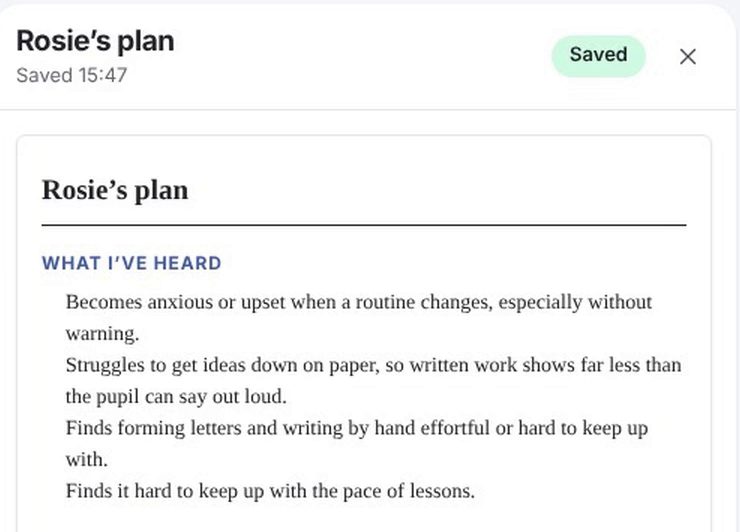
A finished support plan.
Say what you see. The coach asks a few questions, then drafts the plan with clear, measurable targets and the support to go with them.
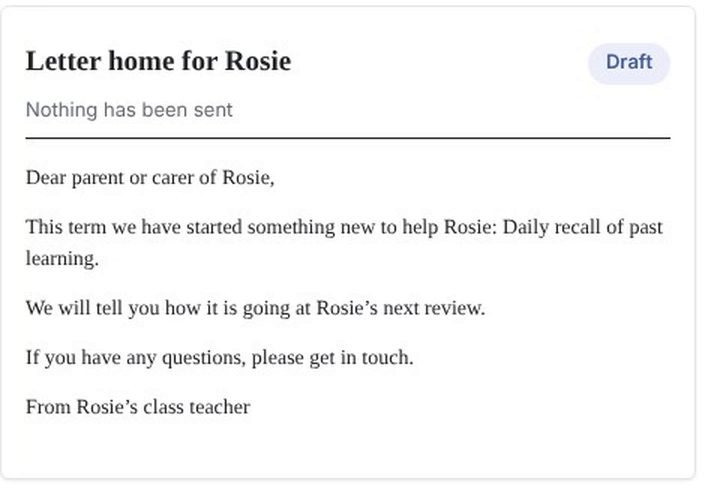
Letters home.
A clear, friendly letter to parents about the plan, in plain words.
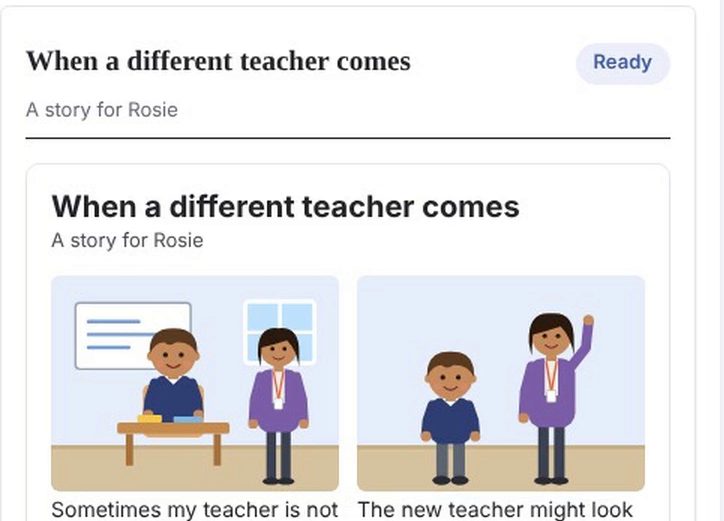
Stories for pupils.
A short story that helps a pupil understand a change or a routine, ready to print.
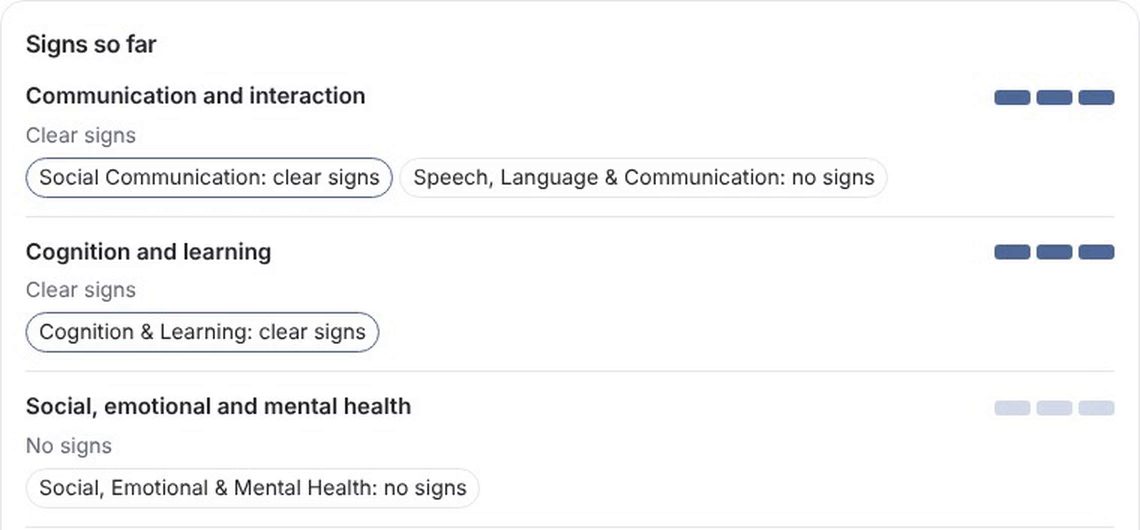
A clear picture of need.
Check every area of need with quick taps, and see where the signs are.
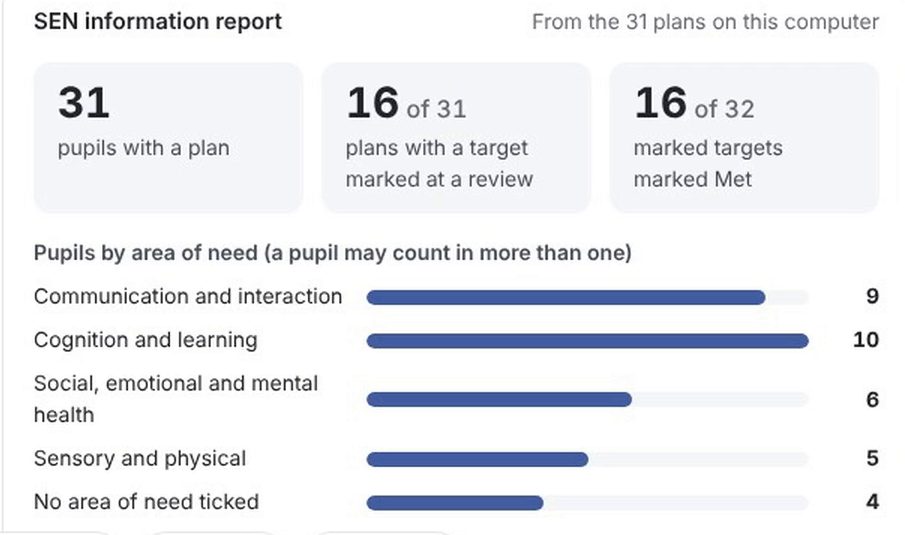
The whole school, for the SENDCo.
Ask about your class or your school and get the numbers on one card. The SENDCo Dashboard shows reviews due and where attention is needed.
Reviews and resources too.
Say how the term went and the coach drafts the review of each target. Ask for a class resource and get one ready to print. The Word file is made in your browser.
Safe to use in school
AI built for SEND.
You stay in charge.
The coach is AI, with our SEND knowledge behind it and the safeguards built in. It can draft a plan, a target or a resource; every draft is reviewed and accepted or rejected by the teacher.
- Names stay on your device. When you type to the coach, your device takes out the names from your plans first.
- You see what is sent. Your words are shown to you before they go.
- Every answer is checked. Each answer is checked before it is shown to you.
- Off until you switch it on. AI is off by default. Using it requires explicit consent, renewed each session, and your SENDCo can switch AI off for the whole school.
When the AI drafts a plan, it sees only the statements you tick, the choices you make and its own earlier wording, never a name. Nothing sent to the AI provider is used to train models, and it is deleted after 30 days.
And the quality engine that checks every plan? It uses no AI at all.
Read our full Use of AI statementPrivate by design
Sensitive information.
Considered protection.
SEND plans hold some of a school's most sensitive information. Privacy belongs in the way the product works.
Encrypted on your device
Plan data is encrypted in your browser with AES-256 before it ever reaches our servers. Even we can't read it.
UK data residency
Pupil plan data is stored in the UK (London).
Mandatory multi-factor authentication
Every account, no exceptions.
Access transparency
Cross-user access is logged, and teachers can see when their plans have been viewed.
 (opens in a new tab)
Cyber Essentials certified, whole organisation. Check our certificate (opens in a new tab)
ICO registered (ZC178448)Cyber Essentials certifiedIndependent DPO (Veritau)Full DPIA availableSigned Data Processing AgreementDocumented sub-processors · For your DPO: read how we handle data
Built from classroom experience
Made by a teacher.
For the work you do.
Built by a teacher who has spent a decade making mainstream classrooms work for every child.
Pilot places are available for UK mainstream schools.
Getting started
A considered start.
For your whole school.
Register interest and we send the pilot paperwork to the person who signs for your school. We’ll be in touch to arrange your school’s start.
Sign the pilot paperwork
Two agreements, signed by your headteacher or the person who signs contracts for your school. Teachers never need to sign them.
We set up your school
We countersign, confirm your start date and help get your school ready.
Your SENDCo holds the keys
Your SENDCo generates the school's encryption key and invites staff.
Teachers plan with the coach
Teachers say what they need and get a finished plan back, and each teacher sees their pupils' support at a glance.
Inclusion keeps improving
The SENDCo sees the whole school, reviews shape the next plan, and the documents are ready when you need them.
Before you get started.
Watch the 3 minute filmIs our pupils' data safe?
Plan data is encrypted on your own devices before it reaches our servers, using keys your school holds — we cannot read it. It's stored in the UK, every account uses multi-factor authentication, and our full DPIA and a signed Data Processing Agreement are available for your DPO.
Can we get our data back — or deleted?
Yes. Your school stays in control: plans export to Word at any time, and if you leave, your data is deleted on request. You're never locked in.
Does the AI see pupil names?
Not the names in your plans. AI is optional and off by default. When it drafts a plan, it sees only the statements you tick, the choices you make and its own earlier wording, never a name. When you type to the coach or to Plan with me, or ask the coach to reword part of a plan, your device takes out the names from your plans first and shows you what will be sent. Please leave out other details that could identify a child.
Does AI make decisions about children?
No. It can draft a suggestion; a teacher reads it and accepts or rejects it. Nothing in the product makes an automated decision about a child.
Will it produce our local authority's format?
It exports to your chosen template, and we can tailor the format on consultation.
Do teachers need SEND training to use it?
No — that's the point. Teachers say what they need in plain words and the coach asks the right questions. The quality coaching explains what's missing and why, in plain English, with sources.
Do we have to use the chat?
No. You can write a plan yourself in the full Assess, Plan, Do, Review builder, with the same guidance at each step.
Is this another system to maintain?
It runs in the browser — nothing to install — and everything exports to Word, so it fits the filing and review processes you already have.
What does it cost?
Free during the preview period.
Can I see it before registering?
You can see it first. The short film near the top of this page shows the coach at work with a made-up pupil. If you would rather write a plan by hand, the practice builder opens with a fictional pupil, no account needed, and nothing you type is saved.
Start with one child.
Inclusion you can see,
not just file.
Watch the short film, or register your school's interest.
Free during preview · No commitment · Built for UK schools
Cautious? Good — you should be, with this data. Start with the Privacy Notice
Already have an account? Sign in